Quiz Maker for Tutors
Send Homework Checks Your Students Open in One Tap
Build a quiz for each private student and send it as a URL. No LMS to set up, no rosters to manage—your students tap the link, answer between sessions, and you see auto-graded results before you meet again.
Free plan available · No credit card required
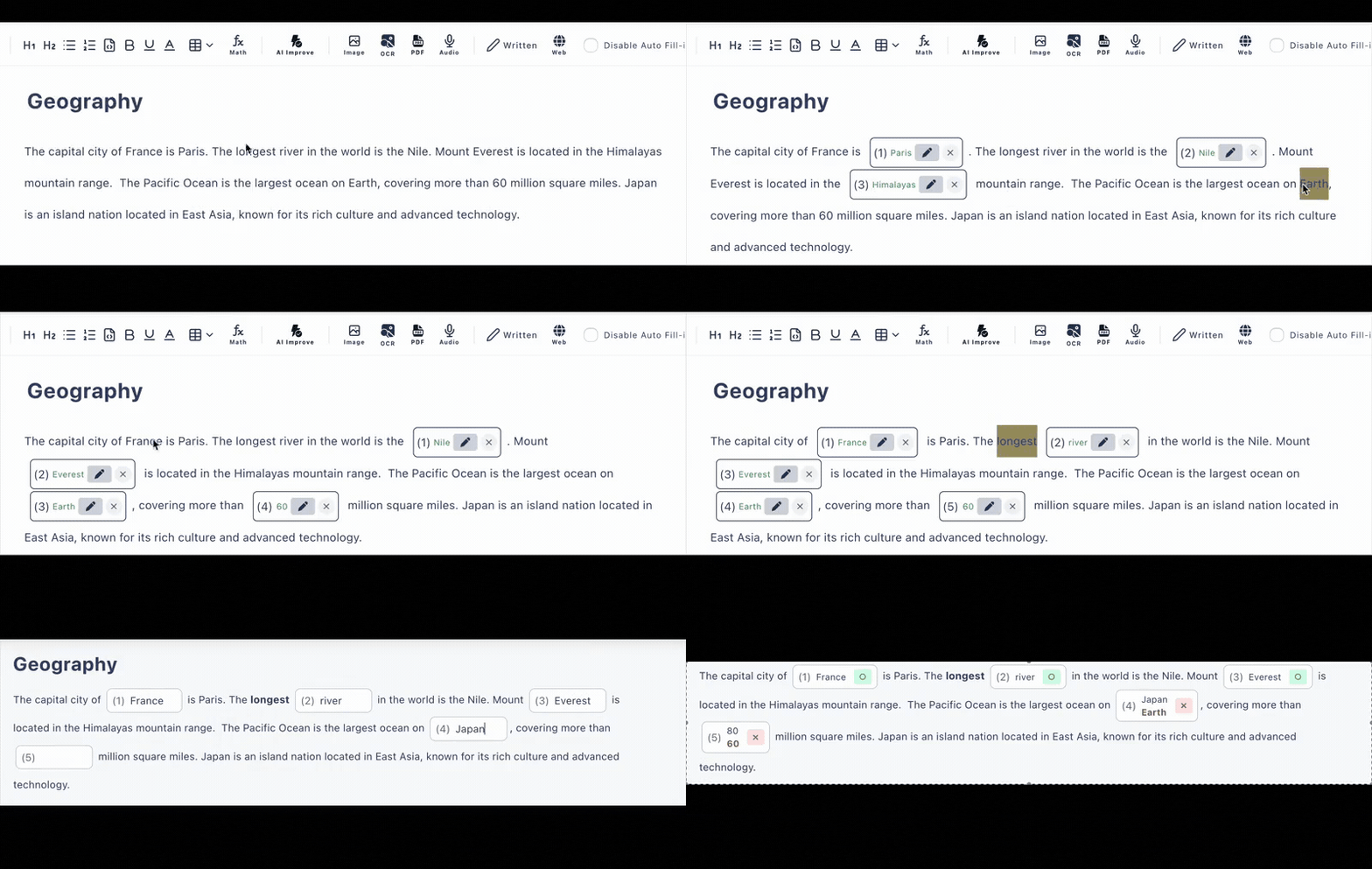
The Between-Session Homework Loop
Tutoring sessions are short and expensive. Spend them teaching—not checking whether last week's material stuck.
After the session: build
Paste your session notes or material and click words to create blanks, or let AI draft the questions. Tailor each quiz to that one student's weak points.
Between sessions: send
Message the URL through whatever you already use—email, WhatsApp, or your scheduling tool. Your student opens it in one tap, on any device.
Before the next: review
Answers are auto-graded on submission. Skim the answer history before the next 1-on-1 and start the session exactly where the gaps are.
Serious Enough for Academic Tutoring
Most quiz tools fall apart the moment you need a fraction, an integral, or a code snippet. Cloze Generator renders math written in LaTeX and code blocks with syntax highlighting.
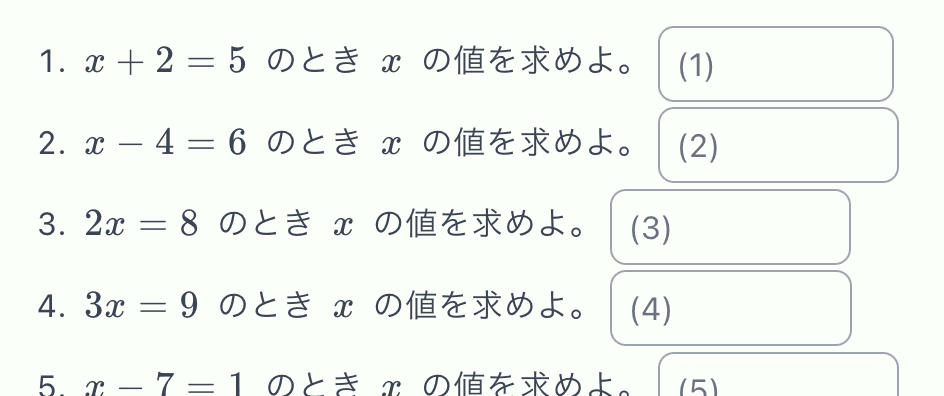
Math & physics
Write formulas in LaTeX and they render cleanly for your student. Blank out a coefficient, a step in a derivation, or the final answer.
Programming
Code blocks with syntax highlighting let you blank out a keyword or a line and ask what belongs there—ideal for CS tutoring homework.
Essays & written work
Written questions with a model answer work for anything auto-grading can't judge—your student compares their response against yours.
Made for 1-on-1, Not Classrooms of 30
Per-Student URLs
Each quiz is a link. Make one per student, per topic, or per week—no LMS, no class setup, no roster imports.
Auto-Grading
Typed and multiple-choice answers are scored on submission, with alternative accepted answers and case-insensitive matching for English.
Answer History
Review what each student submitted and when. The free plan keeps the latest 10 records; the paid plan keeps 300.
Know Who Answered
On the paid plan, require answerers to enter their name (or sign in) before starting—handy when several private students share one link.
AI Question Drafting
Paste material, upload a PDF, or use a photo, and AI drafts the questions for you to refine. Included in the free plan (6 per day).
Hints & Explanations
Attach a hint and a post-answer explanation to each question, so homework reinforces your teaching even when you're not there.
Whatever You Tutor, Check It with a Link
Math Tutoring
LaTeX formulas, step-by-step blanks, exam-style drills
Language Tutoring
Vocabulary and grammar gaps from your own session texts
Coding Tutoring
Syntax-highlighted code blocks with blanked-out lines
Test Prep
Weekly homework checks tied to each student's weak areas
Frequently Asked Questions
Do my students need to create accounts?
No. You send each student a quiz URL, and they open it in any browser on a phone, tablet, or computer. No accounts, no app installs, no LMS, no rosters to maintain.
How do I know which student answered?
On the free plan you can see the answer history (latest 10 records). On the paid plan you can also require answerers to enter their name or sign in before answering, and the history extends to 300 records.
Can I make quizzes for math tutoring?
Yes. The editor supports math formulas written in LaTeX, so you can build algebra, calculus, or physics homework checks with properly rendered notation. Code blocks with syntax highlighting are also supported for programming tutoring.
What question types can I use?
Fill-in-the-blank with typed answers, multiple choice, and written questions with a model answer. You can accept alternative correct answers and enable case-insensitive matching for English.
Is it free for tutors?
There is a free plan with no credit card required: up to 3 private and 10 public quizzes with up to 30 questions each, plus AI quiz generation (6 per day). The paid plan ($12/month, or $8/month billed every 6 months) removes the test limits and adds require-name and collaborative editing.
How does grading work between sessions?
Fill-in-the-blank and multiple-choice answers are graded automatically the moment a student submits, so you can review their results before the next session instead of marking homework at the start of it.