ESL Gap Fill Exercise Maker
Click Any Word to Make a Blank
Take any reading text and blank out exactly what your lesson targets—prepositions, verb tenses, articles, or this week's vocabulary. Students answer online with instant auto-grading, no sign-up needed.
Try with your own text. No sign-up to create a draft; sign in to save and share. Free plan available—no credit card required.
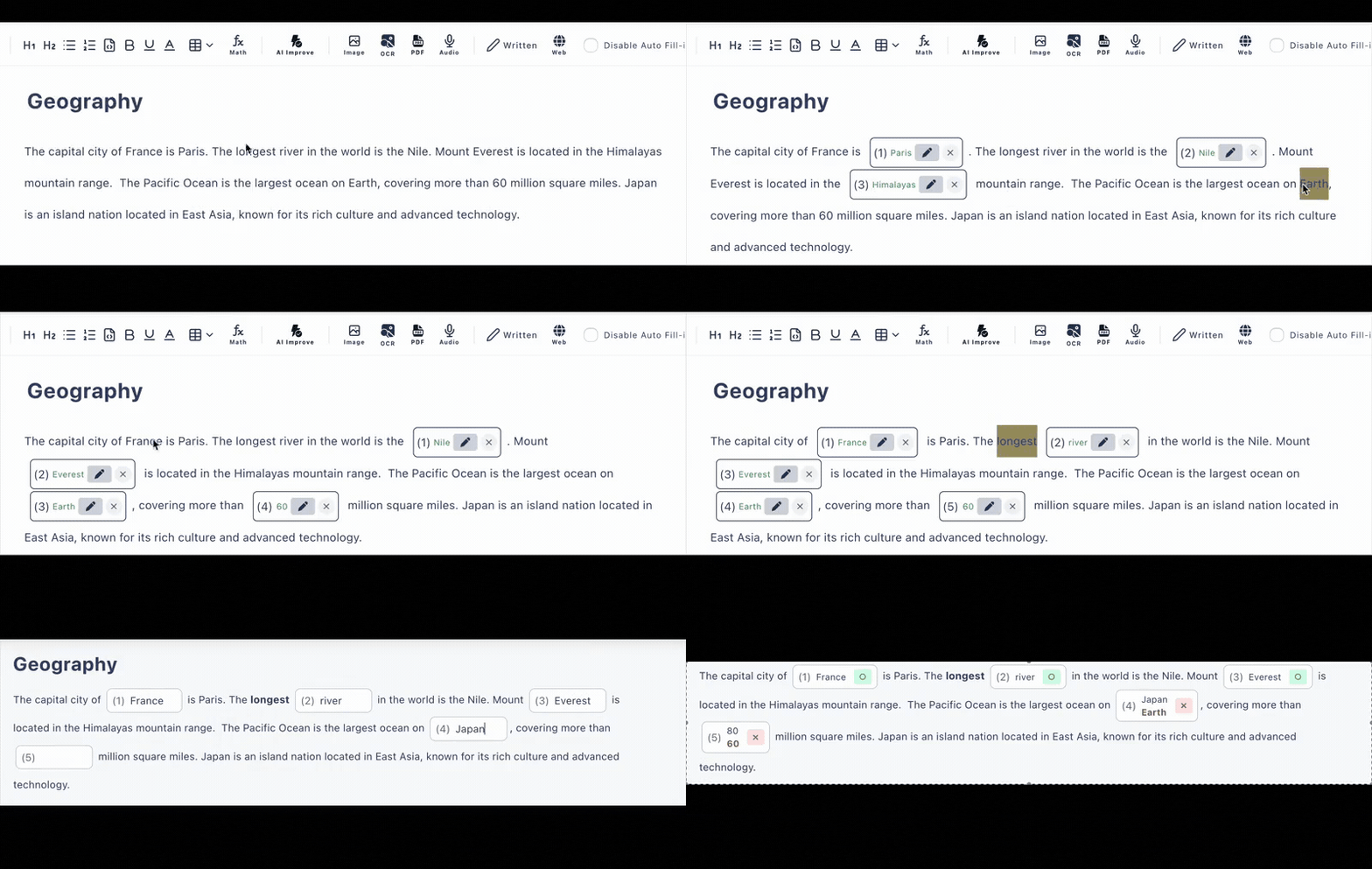
One Reading Text, Four Different ESL Exercises
Because you choose every blank yourself, the same passage can drill whatever your lesson plan needs. Click different words and you have a new gap-fill exercise.
Prepositions
She has lived [ ___ ] London [ ___ ] 2019.
Blank only the prepositions in a passage to isolate in/on/at/since/for decisions—one of the hardest areas for ESL learners at every level.
Verb Tenses
By the time we arrived, the film [ ___ ] already.
Hide the verbs and let students supply the correct form. Add a hint with the base verb so the exercise tests the tense, not the vocabulary.
Articles
We saw [ ___ ] elephant at [ ___ ] zoo.
A classic a/an/the drill from authentic text instead of isolated sentences, so learners see how article choice depends on context.
Target Vocabulary
The weather was [ ___ ], so we cancelled the picnic.
Blank out this unit's word list inside a story so students recall vocabulary in context—far stickier than matching exercises.
Auto-Grading That Is Fair to Language Learners
Fill in the blanks exercises live or die on grading rules. Cloze Generator was built with spelling fairness in mind.
Case-Insensitive Matching
Turn on case-insensitive matching for English answers so a lowercase "monday" is not marked wrong when the grammar was right.
Alternative Answers
Accept several correct answers per blank—British and American spellings, contractions, or synonyms that fit the gap equally well.
Hints & Explanations
Give a first-letter hint per blank and attach an explanation that appears after answering, so feedback arrives while the sentence is still fresh.
An Alternative to Downloadable ESL Worksheets
Worksheet libraries give you someone else's PDF. Cloze Generator turns your text—the article your class just read, your course book unit, your dialogue—into an interactive exercise.
📄 Download-a-PDF worksheet sites
- •Fixed content—rarely matches your syllabus or your students' level
- •Print, hand out, collect, and mark by hand
- •No record of who struggled with which blank
- •Useless for remote or hybrid lessons
⚡ Cloze Generator
- •Built from your own text, pitched at your class—from beginner to advanced (A1 to C2)
- •Share one link through Google Classroom, email, or any LMS
- •Answers graded the moment students submit, with answer history to review
- •Works in class, as homework, or in online lessons—any device, no sign-up
Faster ESL Lesson Prep
Everything you need to go from a raw text to a ready-to-share exercise before the next class.
Click-to-Blank Control
You decide every gap. Target one grammar point or one word list—no random deletion getting in the way of your lesson objective.
AI Generation, 6/Day Free
Paste a text, upload a PDF, or snap a photo of a course book page and let AI draft the gap-fill exercise. Included in the free plan, 6 generations per day.
Typed or Multiple Choice
Keep blanks as typed answers for production practice, or convert them to multiple choice for lower levels and quicker checks.
Audio & Images
Embed your own audio for listening gap-fills, or add images and tables so the exercise looks like a real lesson page, not a plain form.
No Sign-up for Students
Students open the link on a phone, tablet, or computer and start answering. No accounts to create, nothing to install.
Instant Results
Auto-grading on submission plus answer history, so you can see which blanks tripped the class up and reteach exactly that point.
Frequently Asked Questions
Is this ESL gap fill maker free to use?
Yes, there is a free plan with no credit card required. It includes up to 3 private and 10 public exercises with up to 30 questions each, and AI gap fill generation is included (6 per day).
Do my ESL students need to sign up to answer?
No. You share the exercise as a URL and students open it in any browser on a phone, tablet, or computer. No accounts, no installs—ideal for mixed-device classrooms.
What if a student types "colour" instead of "color"?
You can register alternative accepted answers for each blank, so both spellings count as correct. You can also enable case-insensitive matching so "Paris" and "paris" are both accepted.
Can I choose exactly which words become blanks?
Yes. Unlike random-deletion tools, you click each word you want to hide. That lets you target one grammar point—just prepositions, just past-tense verbs, just articles—in any reading text.
Can I make a gap fill from a textbook page or PDF?
Yes. Upload a PDF or a photo of the page and AI extracts the text and drafts gap fill questions you can edit. On the free plan, PDF and image extraction are each available 3 times per day.
Does it work for languages other than English?
Yes. The interface is in English, but your exercise text can be in any language—Spanish, French, Japanese, Chinese, and more—so it works for any language classroom, not only ESL.