AI Fill-in-the-Blank Generator
Paste Text, Click Words, Get an Auto-Graded Test
Let AI blank out the key words in your text—then click any word to adjust exactly which blanks stay. Share the test as a link and every cloze question is graded automatically.
AI generation free 6×/day · Manual blank creation is unlimited and free
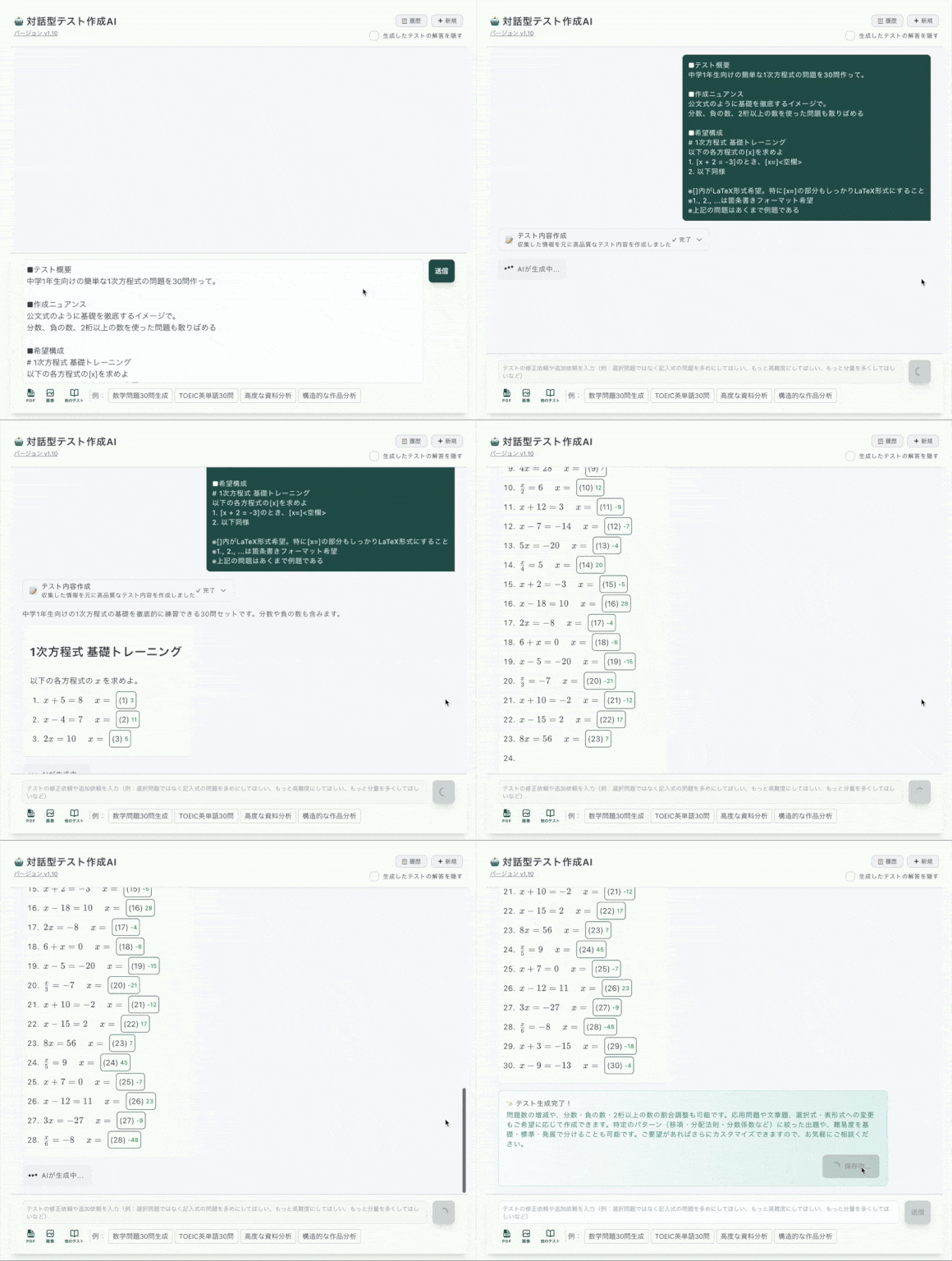
AI Speed, Click-to-Blank Precision
Most AI generators hand you a finished quiz and hope the blanks landed on the right words. Here, the AI draft is just the starting point—you stay in control of every blank.
AI drafts the cloze questions
Paste text, upload a PDF, or snap a photo. AI picks the key terms and blanks them out into a complete fill-in-the-blank test in seconds.
You click words to adjust
AI blanked the wrong word? Click it to restore the text, then click the word you actually want to test. Targeting vocabulary, verb forms, or key dates takes one click each.
Share & auto-grade
Send one link. Answerers need no account, and every blank and choice question is graded instantly when they submit.
What Happens When AI Credits Run Out?
With pure-AI quiz tools, hitting the credit limit means you stop working. Cloze Generator is an editor first—so the click-to-blank workflow never stops.
⛔ Pure-AI generators
- •Out of credits = no more questions today
- •AI decides which words become blanks—take it or leave it
- •Limited editing after generation
✅ Cloze Generator
- •AI generation free 6×/day (10/week)—and manual blank creation stays unlimited
- •Click any word to blank it out or restore it, anytime
- •Full editor: hints, explanations, alternative answers, per-question scores
- •Paid plan raises AI to 20/day & 50/week if you need more
Built for Serious Fill-in-the-Blank Tests
AI Blank Selection
AI reads your text and blanks out the words worth testing—key terms, names, numbers—so a first draft takes seconds, not an evening.
AI Distractor Generation
Turn any blank into multiple choice and let AI write plausible wrong choices (distractors) for you—3 per day free, 30 per day on the paid plan.
Click-to-Blank Editing
The core workflow is a click: hide a word, restore a word. No syntax, no templates, no regenerating the whole quiz to fix one blank.
Alternative Answers
Accept multiple correct answers per blank—synonyms, spelling variants—and enable case-insensitive matching for English so grading stays fair.
Active Recall by Design
Cloze questions force learners to retrieve the missing word from memory—active recall—instead of passively re-reading notes.
One Link, Auto-Graded
Share via Google Classroom, email, or any LMS—just paste the link. Answerers need no account, and results are scored on submission.
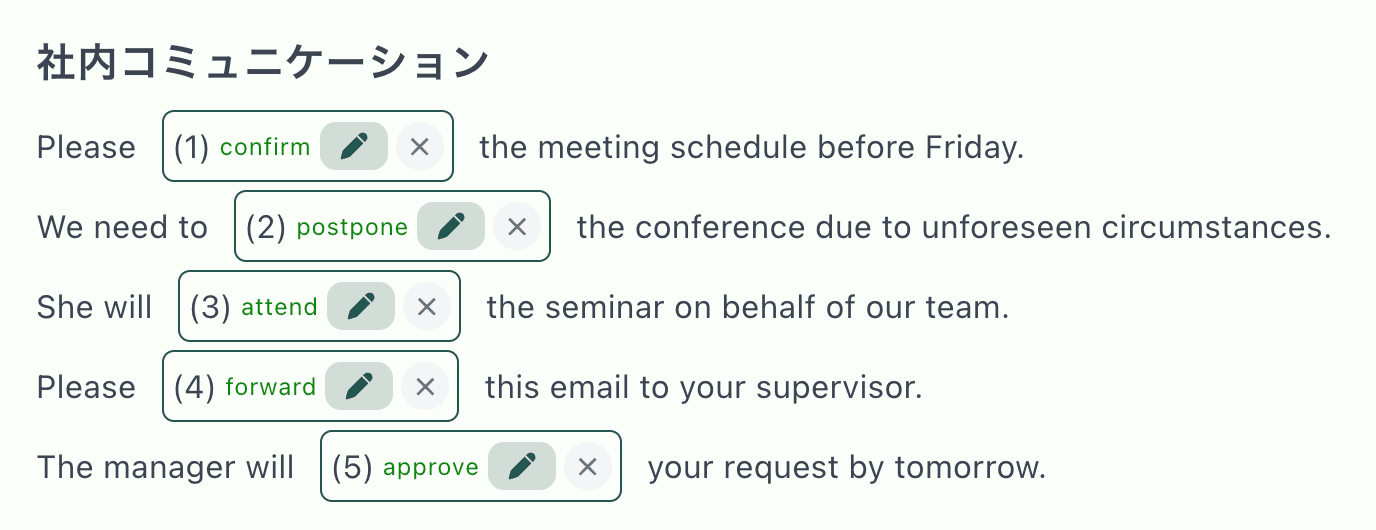
Every Blank Is Yours to Edit
After AI generates the draft, the test opens in the editor. Words with a highlight are blanks—click to toggle them. Add hints, explanations, and alternative answers per question.
Where AI Fill-in-the-Blank Shines
Vocabulary Drills
AI blanks the target words; you fine-tune which forms to test
Exam Review
Generate cloze questions from a chapter, then add AI distractors for multiple choice
Language Learning
Blank out prepositions or conjugations in any language text
Training & Onboarding
Turn manuals and policies into auto-graded comprehension checks
Frequently Asked Questions
How does the AI fill-in-the-blank generator work?
Paste your text (or upload a PDF or photo) and AI drafts a complete fill-in-the-blank test, choosing which words to blank out. You then review the draft in the editor: click any word to add a blank, or remove blanks the AI chose. The result is shared as a URL and graded automatically.
Is the AI generator free to use?
Yes, AI test generation is included in the free plan: 6 generations per day and 10 per week. Manual blank creation—clicking words to hide them—is unlimited and free, so you can keep building and editing tests even after the daily AI limit.
Can AI also create wrong answer choices (distractors)?
Yes. You can convert any blank into a multiple-choice question and let AI generate plausible distractors for it. Distractor generation is available 3 times per day on the free plan and 30 times per day on the paid plan.
Can I edit what the AI generates?
Completely. AI output lands in a full editor where you click words to blank them out or un-blank them, add hints and explanations, accept alternative answers, and adjust scores per question. You are never locked into the AI draft.
How do people answer the test?
You share a URL. Answerers open it in any browser on a phone, tablet, or computer—no account, no app install. Fill-in-the-blank and multiple-choice answers are auto-graded the moment they submit.
Does it work in languages other than English?
Yes. You can write and blank out text in any language, including Spanish, Japanese, and Chinese. The app interface itself is in English.