Song Lyrics Gap Fill Maker
Turn Lyrics into a Listening Exercise
Paste your lyrics, click the words you want learners to catch by ear, and upload your audio. Students listen and fill in the missing words online—auto-graded, no accounts needed.
Try with your own lyrics. No sign-up to create a draft; sign in to save and share. Free plan available—no credit card required.
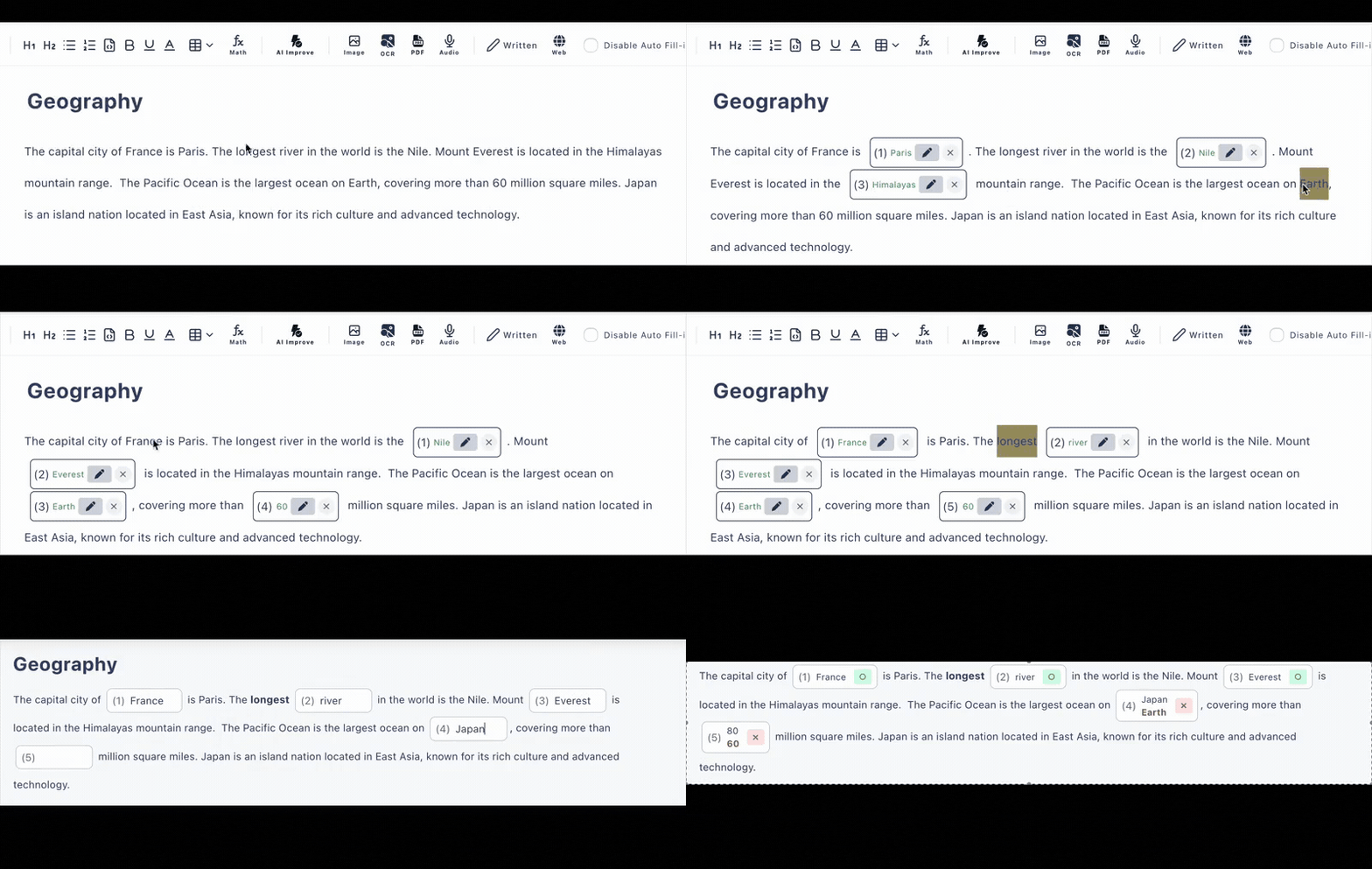
From Lyrics to Listening Exercise in 3 Steps
The classic “fill in the lyrics” activity, without the photocopies or the manual marking.
Paste your lyrics
Use lyrics and audio you have the rights to use in class. Any language works, accents included.
Click words & add audio
Click the words learners should catch by ear—rhymes, weak forms, linked sounds—and upload your audio file into the exercise.
Share the link
Students listen and type the missing words on any device. Answers are graded the moment they submit.
Why Teachers Swap Paper Lyric Sheets for This
Audio in the Exercise
Upload your recording so listening and answering happen on one page—great for homework, not just class time.
Forgiving Auto-Grading
Accept alternative spellings and ignore capitalization, so “Cause” vs “cause” doesn’t cost a point.
Hints per Blank
Give the first letter or a meaning hint on tricky words, and add an explanation that appears after answering.
No Student Accounts
One link, any device. Students don’t sign up, don’t install anything, and results are graded instantly.
Answer History
See submitted answers in your dashboard (latest 10 on the free plan, 300 on paid) to spot the lines everyone misheard.
Reusable Every Term
Your gap fills live online—edit the blanks for a new level and share a fresh link in seconds.
What a Lyrics Gap Fill Looks Like
A made-up example—paste your own lyrics and choose the blanks that match your lesson goal.
Walking down the _____ in the morning light,
I can hear the _____ calling out my name,
Every little _____ gonna be alright.
Blank out rhymes to train sound prediction, weak forms (“gonna”, “wanna”) to train connected speech, or content words to train vocabulary.
Frequently Asked Questions
How do I make a lyrics gap fill exercise?
Paste your lyrics into the editor, click the words you want students to catch by ear, and share the exercise as a link. You can upload your audio file into the exercise so students listen and fill the blanks on the same page.
Can students listen to the song while answering?
Yes, if you upload an audio file into the exercise. Students play it directly on the answer page while typing the missing words. You provide the audio and lyrics you have the rights to use.
Do students need an account?
No. Students open the link in any browser on a phone, tablet, or computer. No accounts and no app installs.
Is the answer checked automatically?
Yes. Typed answers are auto-graded on submission. You can accept alternative spellings and enable case-insensitive matching, which is handy for lyrics.
Is it free?
There is a free plan with no credit card required: up to 3 private and 10 public exercises with up to 30 questions each.