Free Quiz Maker for Homeschool
Turn Any Lesson Into a Self-Grading Test
Paste your lesson text or snap a photo of the textbook page, and AI builds a quiz from your own curriculum. Your kids answer on a tablet, the grading happens by itself, and you see exactly what stuck.
Free plan available · No credit card required
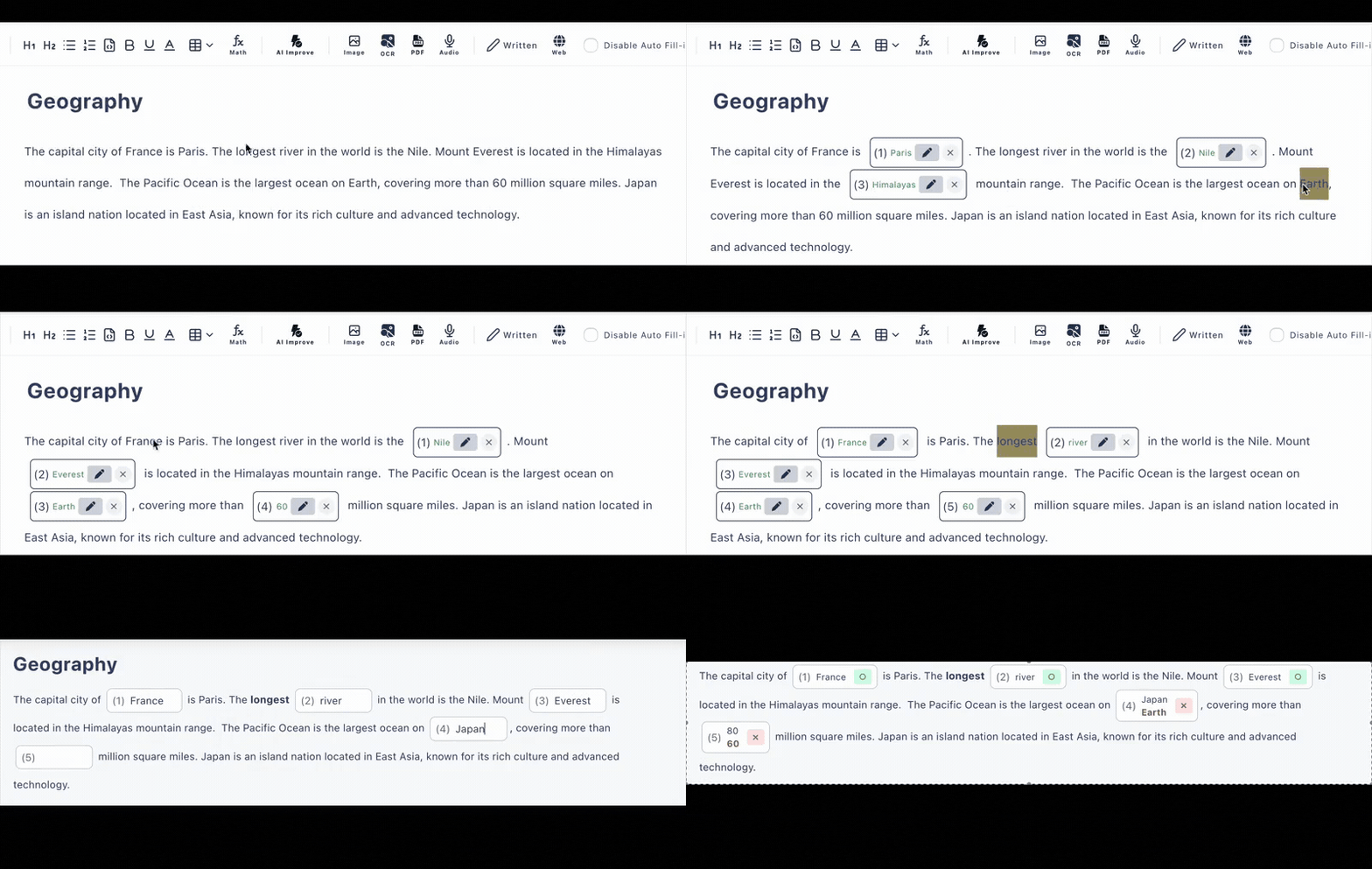
Your Curriculum, Not Someone Else's Trivia
You chose your curriculum carefully. Most quiz apps hand you generic question banks that never quite match what you taught this morning. Cloze Generator starts from your material instead.
Bring today's lesson
Paste the passage you just read together, upload a PDF, or take a photo of the textbook or workbook page. Any subject, any language.
Let AI build the quiz
AI turns the lesson into fill-in-the-blank and multiple-choice questions—or click the words yourself to choose exactly what to blank out. AI generation is free 6 times a day.
Hand over the tablet
Share the quiz as a link. Your child opens it in the browser—no account, no install—and answers are graded the instant they submit.
Lesson Review Without the Evening Grading Pile
Checking what your kids actually retained shouldn't take longer than teaching the lesson did.
😮💨 Review the hard way
- •Hand-writing review questions after a full day of teaching
- •Sitting beside each child to check every answer
- •Premade quiz apps that don't match your curriculum
- •No record of which topics keep tripping them up
☀️ Review with Cloze Generator
- •AI drafts the quiz from your lesson in moments
- •Kids answer independently on a tablet via a link
- •Auto-grading the moment they tap submit
- •Answer history shows you exactly what to reteach
Built for the Way Homeschool Actually Works
Photo & PDF to Quiz
Snap a photo of the workbook page or upload a PDF. AI extracts the text and turns it into questions you can tweak before sharing.
Hints & Explanations
Add kid-friendly hints to each question and explanations that appear after answering—so grading becomes teaching, not just scoring.
Answer History
Review past attempts to spot patterns: the spelling word that keeps slipping, the date that never sticks. Free plan keeps the latest 10 records.
Tablet-Friendly, No Accounts
Kids open a link and start answering. No sign-ups for them, no passwords to remember, nothing to install on the family tablet.
More Than Multiple Choice
Mix fill-in-the-blank, multiple choice, and written answers with a model answer—match the question style to your child's level.
Any Subject, Any Language
Quizzes can include images, audio, tables, and even math formulas. The text can be in any language you teach.
A Quiz for Every Part of Your Day
Homeschool families use quick quizzes to close every lesson with a five-minute check.
Read-Aloud Recall
Paste the passage you read together and blank out key facts
Spelling & Vocabulary
Typed answers with optional hints, checked automatically
History & Geography
Dates, places, and names from your own history curriculum
Science Review
Blank out terms inside definitions so kids recall them in context
Frequently Asked Questions
Is the homeschool quiz maker free?
Yes, there is a free plan with no credit card required. You can keep up to 3 private and 10 public quizzes with up to 30 questions each, and AI quiz generation is included (6 per day on the free plan).
Do my kids need an account to take a quiz?
No. You share each quiz as a link, and your child opens it in the browser on a tablet, phone, or computer. No accounts, no app installs, nothing to set up on their device.
Can I make quizzes from our own curriculum?
Yes—that is the whole point. Paste text from your lesson, upload a PDF, or snap a photo of a textbook page, and AI turns it into quiz questions you can edit. You are never limited to premade trivia.
How does grading work?
Fill-in-the-blank and multiple-choice answers are graded automatically the moment your child submits. You can review the answer history afterward to see exactly which questions they missed.
Can I add hints or explanations for my child?
Yes. Each question can have a hint (like a first letter or a nudge) and an explanation that appears after answering, so a wrong answer turns into a mini teaching moment instead of just a red mark.
Does it work for any subject or age?
Yes. Because quizzes are built from your own material, it works for spelling, history, science, scripture, foreign languages—any subject and any reading level you teach at home.