Gap Fill Exercise Generator
Click Words to Create Blanks
Paste any text, click the words you want to hide, and share your gap fill exercise as a link. Students answer on any device and get instant auto-grading—no printing, no marking by hand.
Free plan available · No credit card required
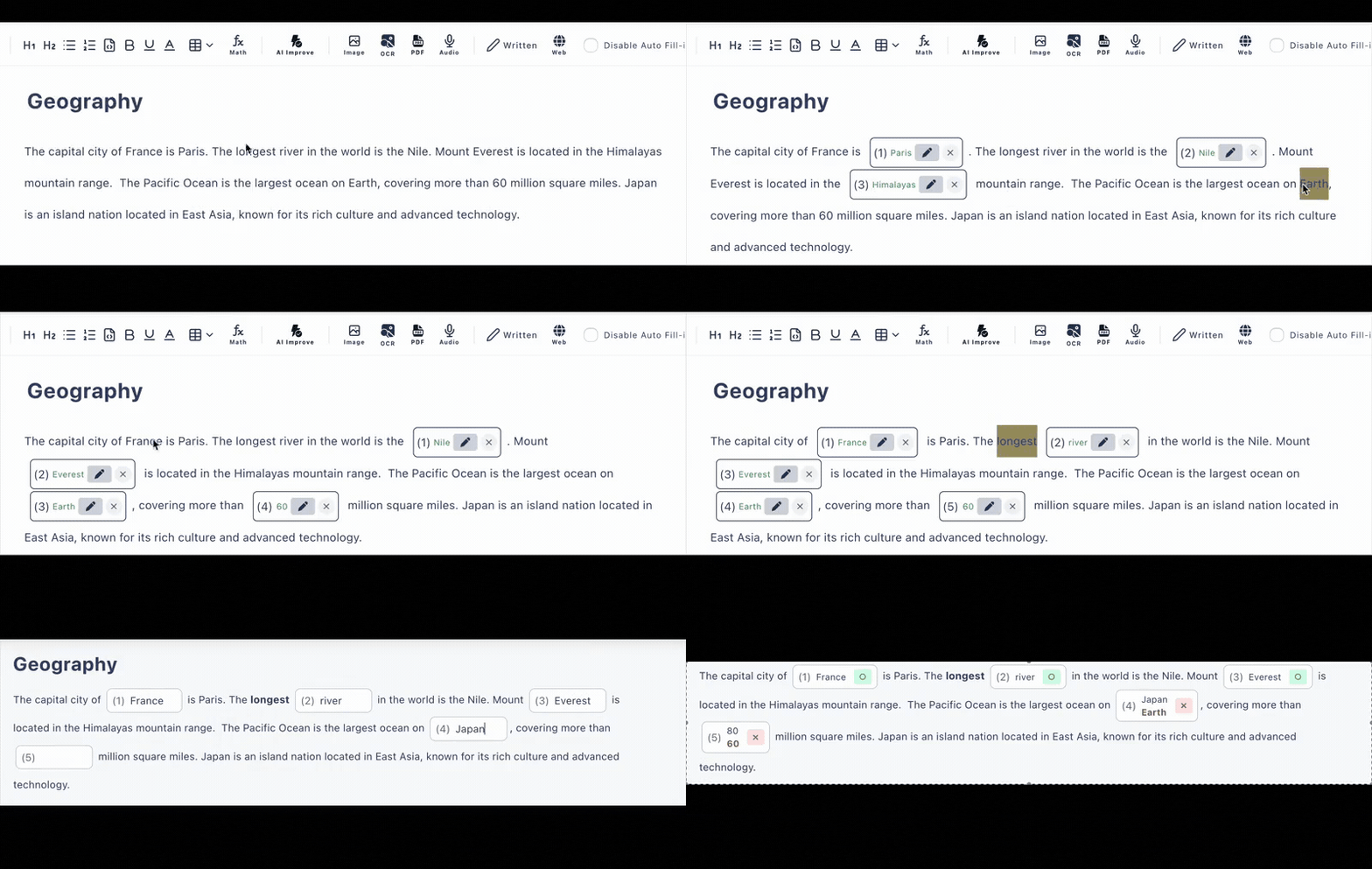
How to Make Blanks in Any Text
Three steps from raw text to a graded gap-fill exercise. Most users finish their first one in minutes.
Paste your text
Any passage works: a reading text, lecture notes, song lyrics, definitions. Any language, including accented characters.
Click words to hide them
Each clicked word becomes a gap. Turn gaps into typed answers or multiple choice, add hints, and accept alternative answers.
Share the link
Students open the URL on any device—no accounts, no installs—and answers are graded the moment they submit.
Beyond Printable Gap Fill Worksheets
Most gap fill generators produce a worksheet you still have to print, hand out, and mark. Cloze Generator makes the whole exercise digital.
📄 Printable worksheet tools
- •Print, distribute, and collect paper
- •Mark every answer by hand
- •No record of who answered what
- •One spelling = one accepted answer
⚡ Cloze Generator
- •Share one URL—works on phones, tablets, PCs
- •Instant auto-grading on submission
- •Answer history so you can review results
- •Alternative answers and case-insensitive matching
Everything a Gap Fill Maker Should Have
Click-to-Blank Editor
You decide exactly which words become gaps—no random deletion. Perfect for targeting vocabulary, verb forms, or key terms.
AI Gap Selection
Short on time? AI generates gap fill questions from pasted text, an uploaded PDF, or a photo. Included in the free plan (6 generations per day).
Auto-Grading
Typed and multiple-choice answers are scored instantly. Accept several correct answers per gap, such as synonyms or alternate spellings.
Hints & Explanations
Add a hint to each gap (first letter, definition) and an explanation that appears after answering, so the exercise teaches as it tests.
Rich Content
Exercises can include images, tables, audio, code blocks, and math formulas—not just plain sentences.
Share Anywhere
Paste the exercise link into Google Classroom, email, or any LMS. Students never need to create an account.
Gap Fill Exercises for Every Lesson
ESL & Languages
Blank out prepositions, verb tenses, or new vocabulary in any reading text
Reading Comprehension
Cloze passages that check understanding from context
Listening Practice
Embed your audio and have learners fill the missing words
Science & Definitions
Hide key terms inside definitions so students recall them in context
Frequently Asked Questions
Is the gap fill exercise generator free?
Yes, there is a free plan with no credit card required. You can create up to 3 private and 10 public exercises with up to 30 questions each. Manual gap creation is unlimited within those exercises, and AI generation is included (6 per day on the free plan).
How do I create gaps in my text?
Paste any text into the editor and click the words you want to hide. Each clicked word becomes a blank that students fill in. You can also let AI choose the gaps from your text, a PDF, or a photo.
Do students need an account to answer?
No. You share your gap fill exercise as a URL, and students open it in any browser on a phone, tablet, or computer. No accounts, no app installs.
Is it graded automatically?
Yes. Typed answers and multiple-choice answers are scored instantly when students submit. You can accept alternative answers (e.g. synonyms or spelling variants) and enable case-insensitive matching for English.
Can I make a gap fill from a worksheet or textbook page?
Yes. Upload a PDF or a photo of the page, and AI extracts the text and generates gap fill questions you can edit. On the free plan, PDF and image extraction are each available 3 times per day.