Fill in the Blank Test Generator
Online, Auto-Graded, Free to Start
Build a fill in the blank test from any text, PDF, or image, share it as a URL, and get instant grading with answer history. This is online testing—no printing, no manual marking, no spreadsheets.
Try with your own text. No sign-up to create a draft; sign in to save and share. Free plan available—no credit card required.
How to Turn Any Text into a Test with Blanks
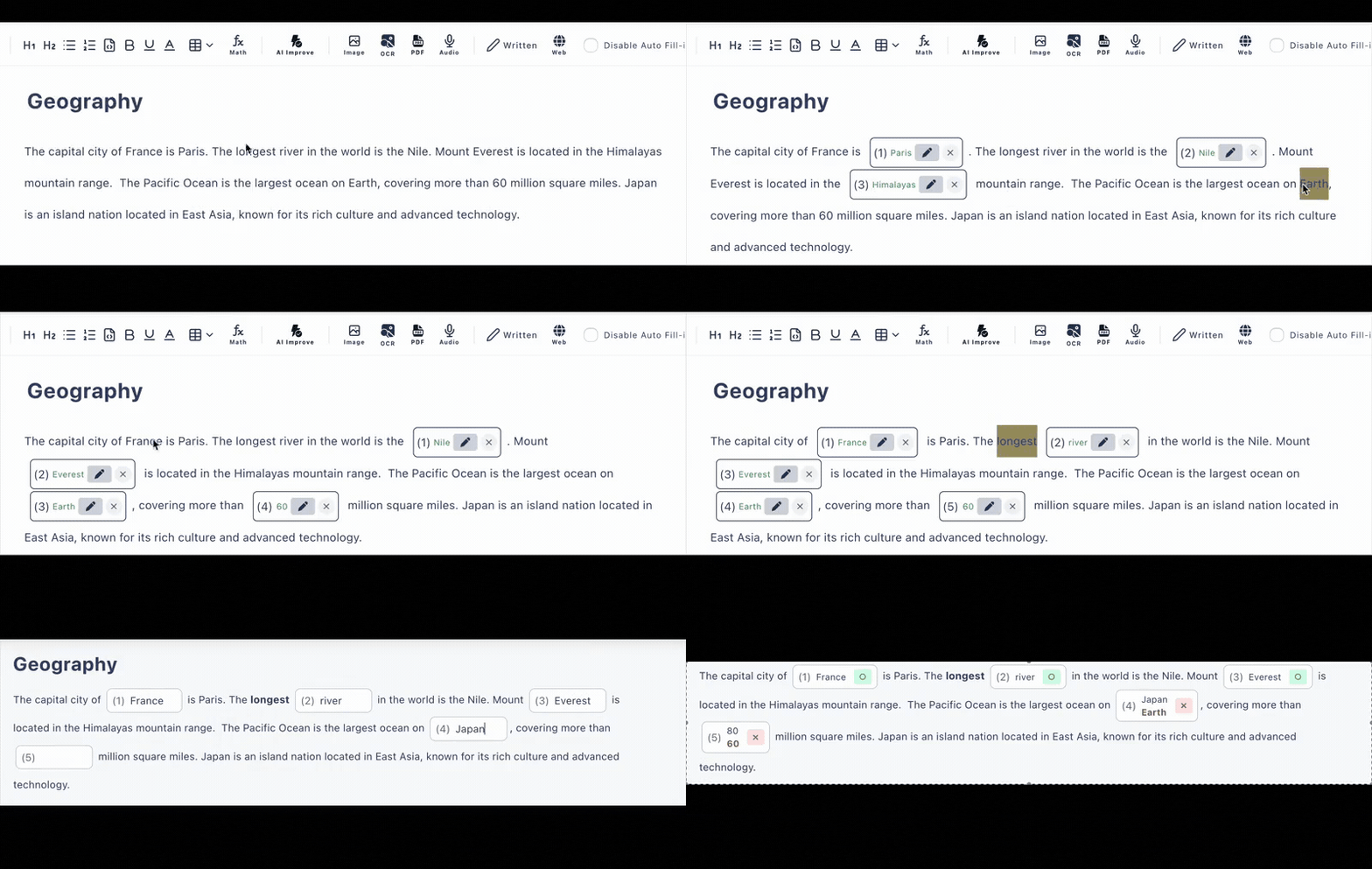
Four steps take you from raw study material to a graded online test. No formatting work, no question templates to fill out.
Bring your material
Paste text directly, or upload a PDF or a photo of a page. The generator works with text in any language.
Create the blanks
Click the words you want hidden, each becoming a cloze sentence—or let AI pick the blanks for you (6 AI generations per day on the free plan).
Refine the questions
Convert blanks into multiple choice with answer options, add hints and explanations, set per-question scores, and register alternative correct answers.
Share the test URL
Send one link through Google Classroom, email, or any LMS. Test takers answer in their browser and see scores instantly.
Built for Online Testing, Not Paper
Many fill in the blank generators stop at producing a document. Cloze Generator delivers the test, collects the answers, and grades them—because the test itself lives online.
Instant Grading
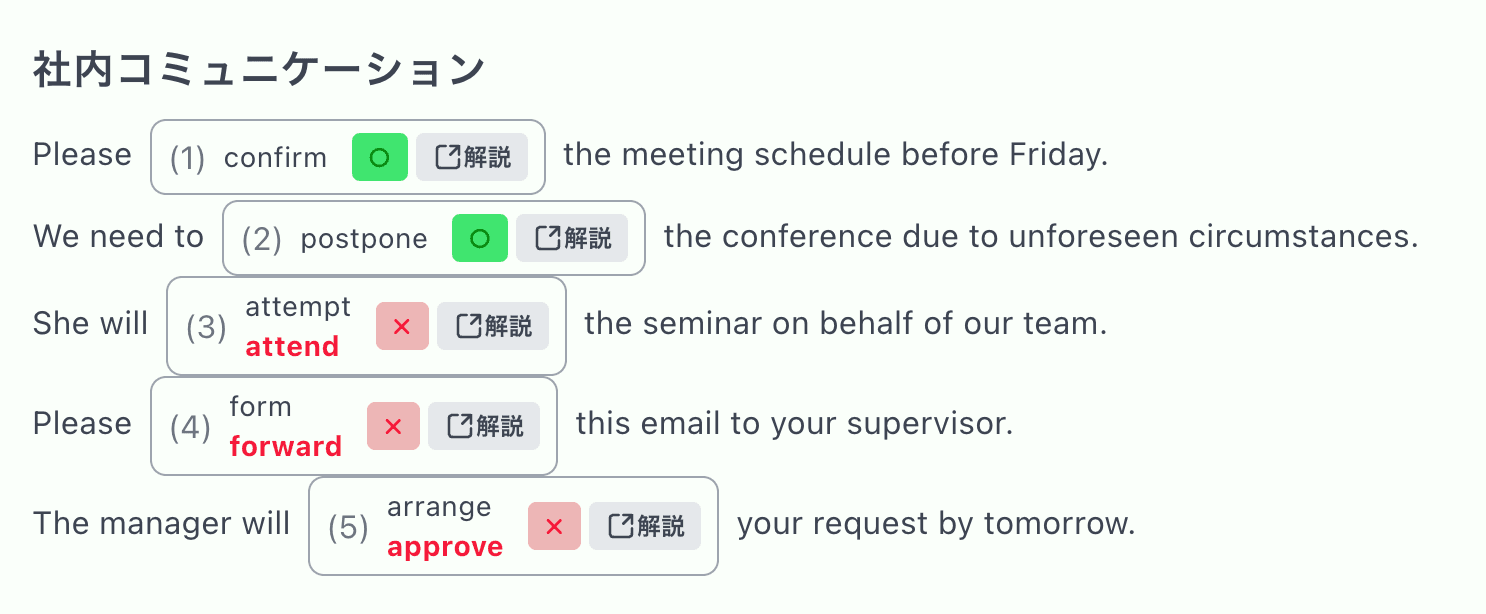
Typed blanks and multiple-choice questions are scored automatically on submission. Case-insensitive matching is available for English answers.
Answer History
Every submission is recorded so you can review results later—the latest 10 records on the free plan, 300 on the paid plan.
Controlled Access
Keep a test private, list it in the public test directory, or (on the paid plan) require a name or login before answering for more formal testing.
AI Test Generation
AI builds complete tests from text, PDFs, or images—and can generate plausible wrong answer options for multiple-choice questions.
Mixed Question Types
Combine typed cloze sentences, multiple choice with answer options, and written questions with model answers in a single test.
Any Device, No Accounts
Test takers open the URL on a phone, tablet, or computer. No student accounts, no app installs, no setup on their side.
Results the Moment the Test Is Submitted
When a test taker submits, every blank and answer option is checked automatically and the score appears immediately. You don't collect papers or compare against an answer key—the answer key is built into the test.
Because each blank can accept multiple correct answers, fair grading doesn't require perfectly identical wording. Add an explanation per question so the result screen doubles as feedback, not just a score.
Who Uses an Online Fill in the Blank Test?
Classroom Assessment
Unit tests and review tests delivered by link, graded before class ends
Corporate Training
Check comprehension after onboarding or compliance material—no LMS build-out
Language Testing
Cloze sentences targeting grammar, vocabulary, and verb forms in any language
Self-Study
Turn your own notes or a textbook PDF into a test and quiz yourself anywhere
Frequently Asked Questions
Is the fill in the blank test generator free to use?
Yes, there is a free plan with no credit card required. It includes up to 3 private tests and 10 public tests, with up to 30 questions per test. AI test generation is also included on the free plan (6 generations per day).
Is this an online test or a printable worksheet?
It is a fully online test. You share the test as a URL, students answer in their browser on any device, and fill-in-the-blank and multiple-choice answers are graded automatically the moment they submit.
Can the AI build a test from my own material?
Yes. Paste plain text, upload a PDF, or upload an image of a page, and AI extracts the content and generates fill-in-the-blank questions you can edit before sharing.
Do test takers need an account?
No. Anyone with the test link can answer in a phone, tablet, or computer browser without creating an account or installing an app. As the creator, you sign in with a Google account.
Can I see who answered and how they scored?
Yes. Each test keeps an answer history (latest 10 records on the free plan, 300 on the paid plan), and you can optionally require a name or login before answering.
Can a blank accept more than one correct answer?
Yes. You can register alternative accepted answers per blank (for synonyms or spelling variants) and enable case-insensitive matching for English answers.