Free Employee Training Quiz Maker
Paste Your SOP, Get a Graded Quiz
Turn training documents, SOPs, and policy PDFs into auto-graded knowledge checks with AI. Staff answer via a link on any device—no account creation—and you see who understood what.
Free plan available · No credit card required
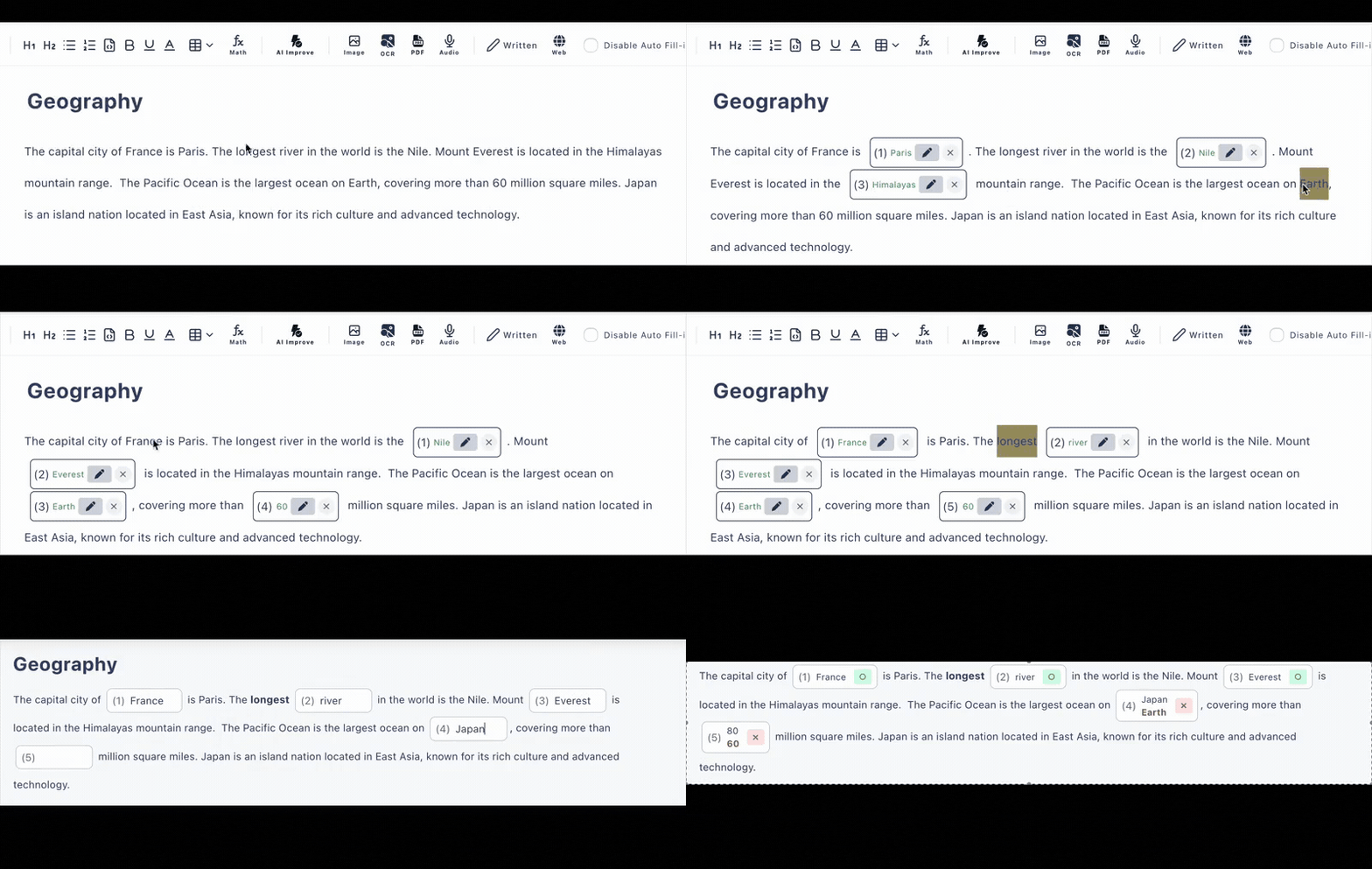
From Training Document to Knowledge Check
The material you already wrote—onboarding guides, SOPs, safety procedures, policy updates—is the quiz. AI does the conversion; you review and share.
Feed in the source material
Paste the text of an SOP, upload the PDF, or photograph a printed manual page. AI extracts the content and drafts questions (free plan: 6 generations per day).
Review and refine
Edit any question, switch between fill-in-the-blank and multiple choice, set scores per question, and add explanations that reinforce the procedure being tested.
Send the link, collect results
Staff answer in their browser on any device—no account creation. Auto-grading scores every submission instantly, and results land in your answer history.
AI Drafts the Questions. You Keep the Standards.
Writing assessment questions is the slowest part of building a compliance check or onboarding quiz. AI generation removes that bottleneck: it reads your text, PDF, or image and proposes questions with answers already set for auto-grading.
Every generated question remains fully editable, so subject-matter experts can correct nuances before anything reaches staff. On the paid plan, collaborative editing lets your training team work on the same quiz together.
Generate a Quiz from Your SOP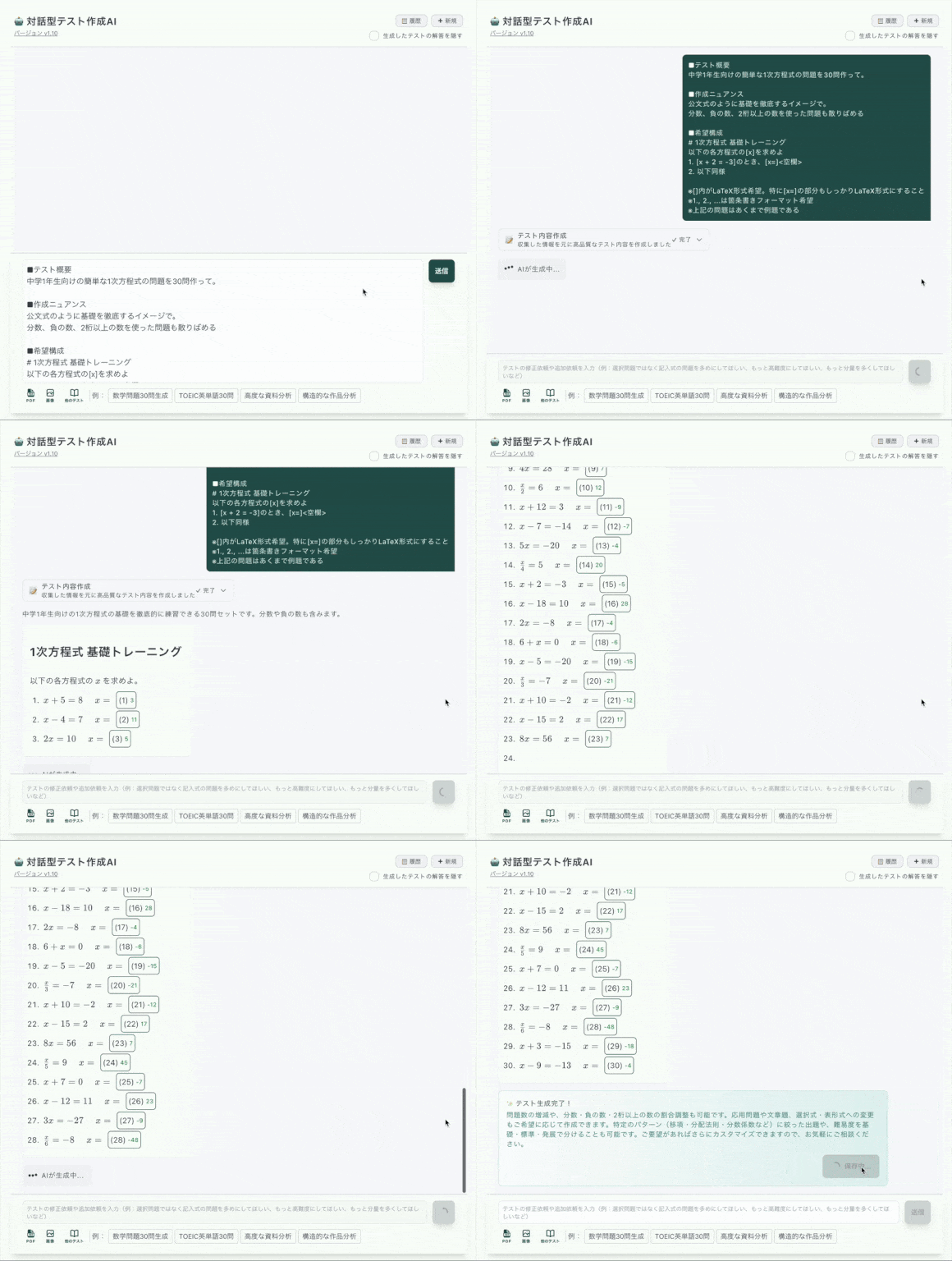
Verify Understanding, Not Just Attendance
A training session proves people were present. A knowledge check proves they understood. Choose the level of identification your process requires.
Open link
Free plan
Anyone with the link can answer anonymously. Good for quick pulse checks after a team briefing.
Require a name
Paid plan
Staff enter their name before starting—still no account creation—so each result in your history is attributable to a person.
Require login
Paid plan
For compliance checks where identity matters, require answerers to be signed in for verified results.
Practical Tooling for Training Teams
PDF & Image Input
Upload policy PDFs or photograph printed manuals—AI extracts the text and builds questions from it.
Auto-Grading
Fill-in-the-blank and multiple-choice answers are scored the moment staff submit. Written answers show a model answer for quick review.
Answer History
Submissions and scores are kept per quiz: the latest 10 records on the free plan, up to 300 on paid.
Works on Any Device
Frontline staff on phones, office staff on PCs—the same link works everywhere, with nothing to install.
Collaborative Editing
On the paid plan, multiple training-team members can edit the same quiz, keeping question banks for each procedure current.
Rich Question Content
Include tables, images, and structured text in questions—useful for equipment diagrams, process tables, and screenshots.
Knowledge Checks Across the Employee Lifecycle
Onboarding
Confirm new hires absorbed the handbook before their first week ends
Compliance Checks
Test understanding of safety procedures and policy updates, with verified results on the paid plan
SOP Rollouts
When a procedure changes, paste the new SOP and quiz the affected team the same day
Product Knowledge
Keep sales and support teams sharp on features, pricing rules, and messaging
Frequently Asked Questions
Is the employee training quiz maker free?
There is a free plan with no credit card required: up to 3 private and 10 public quizzes, 30 questions each, with auto-grading and the latest 10 answer records per quiz. AI quiz generation from text, PDFs, and images is included (6 per day on the free plan).
Can AI build a quiz from our SOP or training manual?
Yes. Paste the document text, upload a PDF, or photograph a printed page, and AI generates knowledge-check questions you can edit before sharing. You stay in control of every question and answer.
Do employees need to create accounts?
No. Staff open the quiz link in any browser—phone, tablet, or computer—answer, and are auto-graded instantly. No account creation, no app installs, no IT tickets.
How do I verify who completed the knowledge check?
The paid plan adds a require-name option (answerers enter their name before starting) and a require-login option for stricter verification. On the free plan, submissions are anonymous.
Can my training team edit quizzes together?
Yes—collaborative editing is available on the paid plan, so multiple team members can work on the same quiz. The paid plan also extends answer history from 10 to 300 records per quiz.
How do we distribute the quiz to staff?
Share the quiz URL through email, your chat tool, or any internal system—anywhere you can paste a link. Results are graded automatically on submission and collected in your answer history.