Turn Your Notes into a Practice Quiz
Paste Text, Upload a PDF, or Snap a Photo
Whatever form your notes take—typed lecture notes, a PDF study guide, or handwritten pages—make a self-quiz from them in one tool. Answer in your browser, get instant auto-grading, and see exactly what you haven't memorized yet.
Free plan available · No credit card required
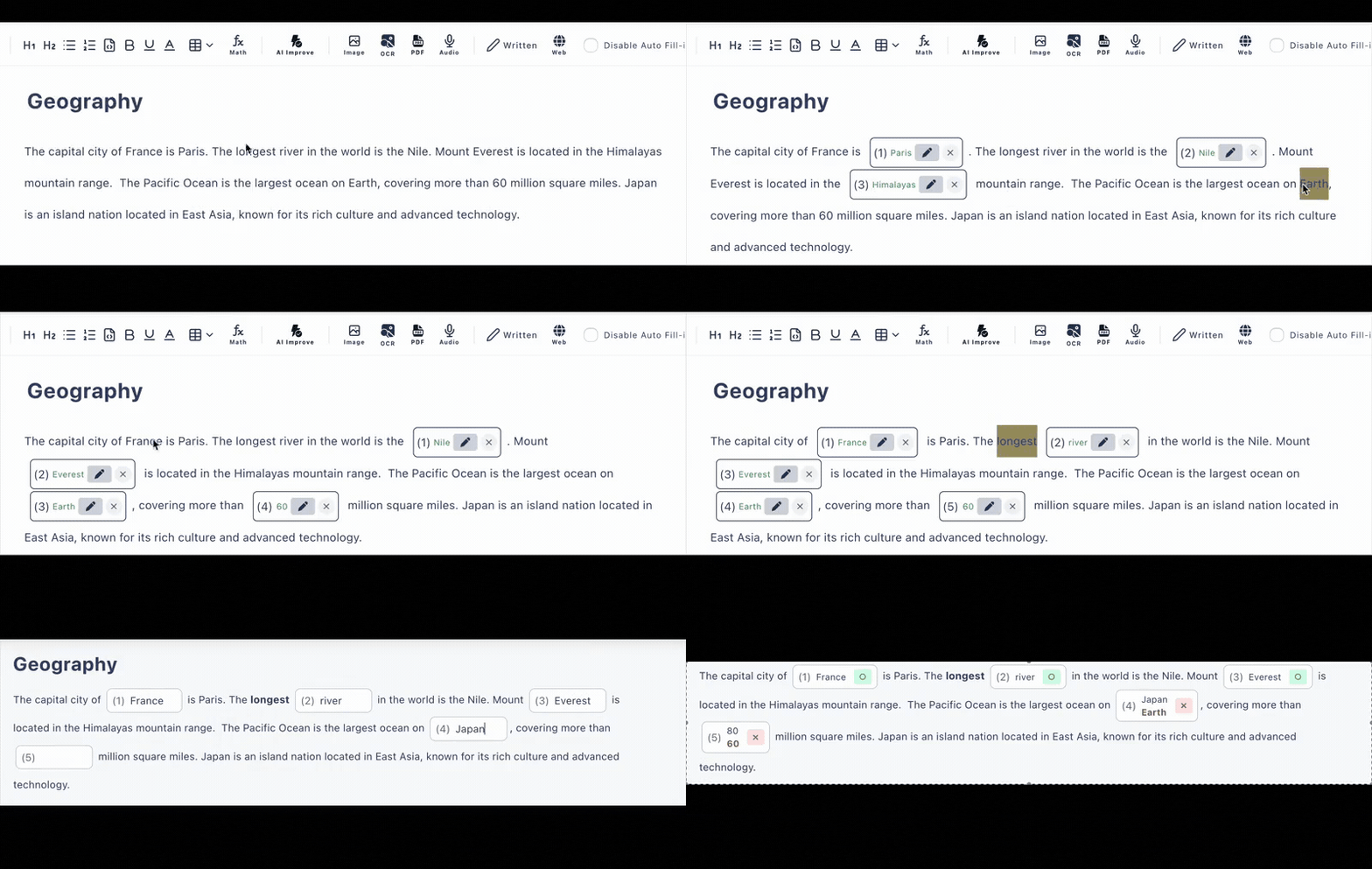
Your Notes Aren't All in One Format. Neither Are We.
Some notes live in a doc, some in a professor's PDF handout, some in a paper notebook. One tool handles all three—no copying between apps.
Paste typed notes
Copy your lecture notes or study guide straight into the editor. Let AI pick the key terms to quiz, or click the words you keep forgetting to blank them out yourself—clicking is unlimited and free.
Upload a PDF handout
Course slides exported to PDF, a syllabus summary, a shared study guide—upload it and AI extracts the content and drafts practice questions (PDF extraction: 3/day free, 20/day paid).
Snap handwritten notes
Photograph your notebook page and AI reads it with OCR (3/day free, 20/day paid). Fix anything it misread in the editor before you start quizzing yourself.
Re-Reading Feels Productive. Recall Actually Is.
When you re-read notes, everything looks familiar—so your brain assumes it's learned. A practice quiz removes that illusion: the blank either comes back to you or it doesn't. That act of retrieving an answer from memory is active recall, and it's the reason self-quizzing beats highlighting.
Every attempt is saved to your answer history (latest 10 records free, 300 on the paid plan), so you can retake the same quiz before the exam and revisit how earlier attempts went. The questions you missed are the sections of your notes to review next.
Add hints and explanations to your own questions, accept alternative answers like abbreviations, and the quiz becomes a study guide that talks back.
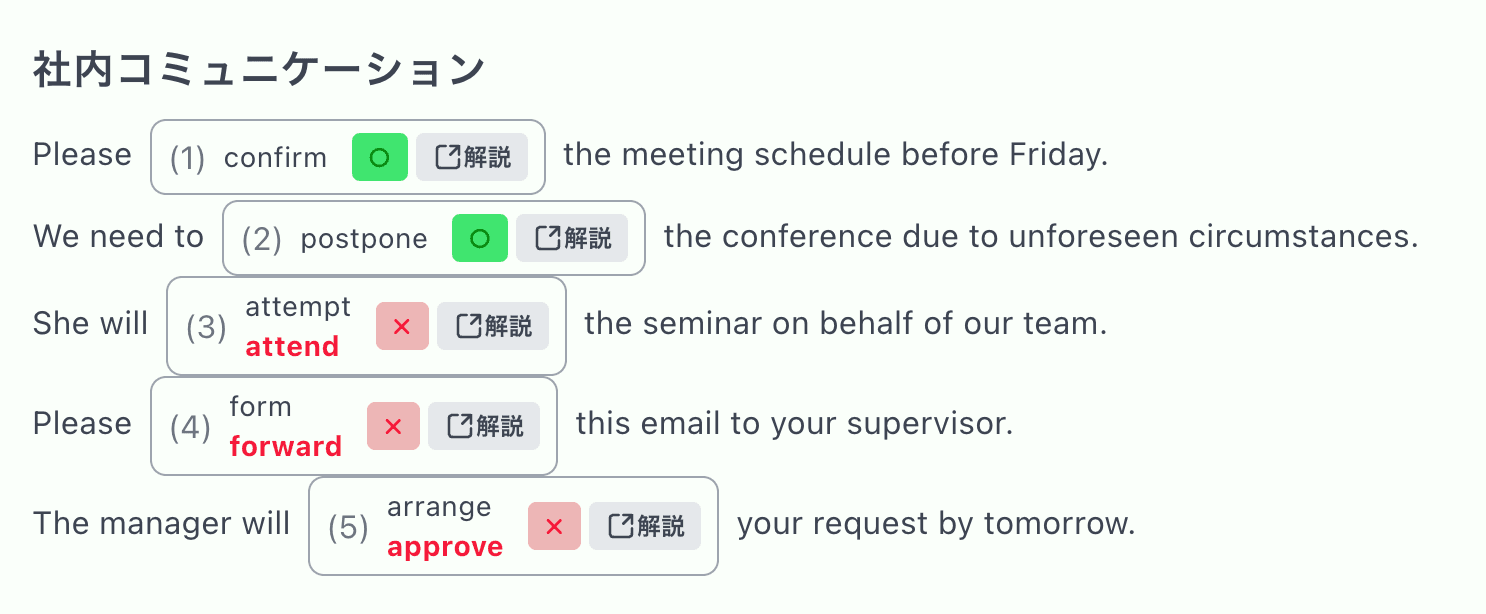
Made for Studying, Not Just Testing
AI Question Drafting
AI turns notes into fill-in-the-blank and multiple-choice questions—included in the free plan, 6 per day.
Click Your Weak Spots
Know exactly which terms you forget? Click them in your pasted notes to blank them out—unlimited and free.
Answer History
Revisit past attempts (10 records free) to see whether the gaps in your memory are closing before test day.
Hints & Explanations
Attach a hint or a why-it-matters explanation to each question, so wrong answers teach instead of just scoring zero.
Quiz Anywhere
Your practice test is a URL—run through it on your phone on the bus or on your laptop at the library.
Share with Study Groups
Send the link to classmates—they answer without creating accounts, and everyone gets auto-graded results.
Notes That Become Quizzes
Lecture Notes
Quiz yourself the same evening while it's fresh
Study Guides
Turn the exam study guide PDF into a practice test
Terminology-Heavy Courses
Anatomy, law, history—blank out the terms that must be exact
Language Vocab Lists
Notes in any language work—quiz with typed answers
Frequently Asked Questions
How do I make a quiz from my notes?
Three ways: paste your typed notes as text, upload a PDF handout, or snap a photo of handwritten notes. AI generates a practice quiz from the content, or you can paste the notes and click words yourself to turn them into blanks. Then answer it in your browser with instant auto-grading.
Is it free to turn notes into a quiz?
There is a free plan with no credit card required. AI quiz generation is included (6 per day, 10 per week); PDF and photo extraction are each 3 per day on the free plan. Making blanks manually by clicking words is unlimited.
Can I retake my quiz and see past results?
Yes. Each test keeps an answer history—the latest 10 records on the free plan, 300 on the paid plan—so you can retake a quiz before an exam and compare with earlier attempts.
Why quiz myself instead of re-reading notes?
Retrieving an answer from memory (active recall) is a more effective way to study than passively re-reading. Fill-in-the-blank questions force you to recall the exact term, and auto-grading shows you immediately which parts of your notes have not stuck yet.
Can I share the quiz with a study group?
Yes. Every quiz is shared as a URL. Friends open it in any browser on a phone, tablet, or computer—no accounts, no installs—and their answers are auto-graded too.