A Google Forms Alternative
Built for Quizzes
Forms treats quizzes as a checkbox setting. Cloze Generator treats them as the product: real fill-in-the-blank questions, auto-grading by default, and respondents who never need to sign in.
Free plan available · No credit card required
The Question Type Forms Was Never Built For
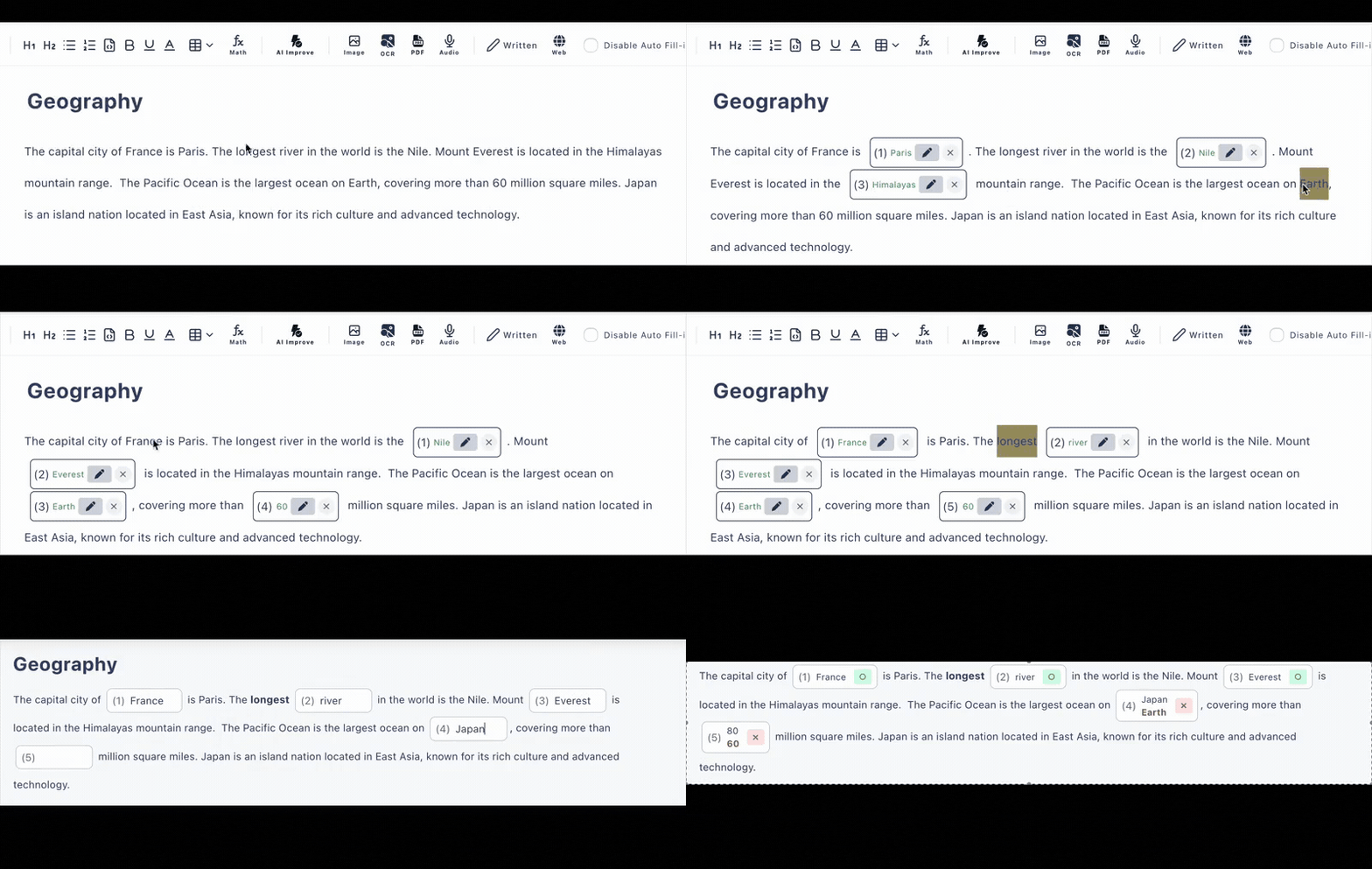
In Google Forms, a fill-in-the-blank question is a workaround: you split the sentence, add a short-answer field, and hope the spelling matches exactly. In Cloze Generator, you paste the passage and click words—the blank lives inside the text, with alternative answers and case-insensitive matching built in.
Click-to-Blank Editing
Turn any passage into a cloze test in minutes. Choose typed answers or multiple choice per blank.
Rich Question Content
Tables, images, audio, code blocks with syntax highlighting, and math formulas via LaTeX—content Forms can't express in a question.
AI Generation Included
Generate a draft quiz from pasted text, a PDF, or a photo (6/day on the free plan), then click to adjust the blanks.
An Honest Comparison
Google Forms is excellent—and free—for surveys and simple checks. Here is where a dedicated quiz tool earns its place.
| Google Forms | Cloze Generator | |
|---|---|---|
| Fill-in-the-blank questions | Workaround with short-answer fields | Click words in your text to create blanks |
| Auto-grading | Available via quiz mode settings | On by default for blanks & multiple choice |
| Multiple accepted answers per blank | Limited setup per question | Alternative answers + case-insensitive option |
| Rich question content | Images & videos | Images, tables, audio, code blocks, math (LaTeX) |
| AI test generation | Not built in | From text, PDF, or images (free: 6/day) |
| Respondent sign-in | Optional (Google account when required) | Not needed—answer via URL |
| Price | Free with a Google account | Free plan (3 private + 10 public tests); paid $12/mo |
Google Forms capabilities summarized in general terms and may change; check Google's documentation for current details.
Use the Right Tool for the Job
Stick with Google Forms when…
- •You're collecting opinions, sign-ups, or survey responses
- •Your quiz is a quick multiple-choice check and Forms already fits your workflow
- •You need unlimited forms at zero cost
Switch to Cloze Generator when…
- •Fill-in-the-blank or cloze questions are the heart of your assessment
- •You want fair auto-grading with alternative answers and case-insensitive matching
- •Your questions need tables, audio, code, or math formulas
- •You want AI to draft the quiz from a text, PDF, or photo
Frequently Asked Questions
Why use this instead of Google Forms for quizzes?
Google Forms is a survey tool with a quiz mode added on top. Cloze Generator is built only for tests: you click words in a text to create fill-in-the-blank questions, auto-grading is the default, and you can accept several correct answers per blank. If you mostly run surveys, Forms remains a great free choice.
Can I make real fill-in-the-blank questions?
Yes—this is the core of the product. Paste any passage and click the words you want to hide. In Forms you would have to rebuild the sentence around a short-answer field; here the blank lives inside the text, the way cloze questions should.
Do respondents need a Google account?
No. You share a URL and anyone can answer in the browser on any device, with no sign-in. (You as the creator sign in with a Google account.)
Is grading automatic?
Yes, by default. Fill-in-the-blank and multiple-choice answers are scored on submission, with alternative accepted answers and optional case-insensitive matching for English.
Is it free like Google Forms?
There is a free plan (no credit card): up to 3 private and 10 public tests with 30 questions each, including AI test generation 6 times per day. Unlike Forms, unlimited usage requires a paid plan ($12/month or $48/6 months)—we are honest about that.